
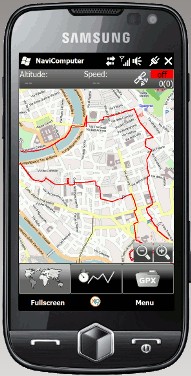
 Having already covered navigation and tracking software for Android phones (MyTracks) and for the iPhone (MotionX GPS), we also want to introduce the free software for Windows Mobile phones such as the HTC HD2. It is a shame there are so few rugged outdoor phones that come with a GPS receiver and navigation software.
What NaviComputer can do
- Offline map navigation (no internet connection or data plan needed)
- Easy map downloads from online sources such as OpenStreetMap
- Finger-friendly controls and a smooth user interface
- Track recording with statistics for speed, distance and elevation profile
- Sticks to the standard GPX file format (import and export)
- Multilingual interface (English, German, Spanish, French, Italian and Dutch)
 The ability to use the map material without an internet connection is particularly appealing. The software comes together with a PC program called “NaviMapper”, which you use to download the maps for your mobile device. Maps can also be downloaded straight from the phone.
Screenshots of NaviComputer


System requirements for the phone
- Windows Mobile 6 operating system
- WVGA, VGA, QWVGA or QVGA touch display
- .NET Compact Framework 3.5
- GPS receiver (a built-in receiver is recommended, but external receivers should work too)
System requirements for the PC
- Windows XP, Windows Vista or Windows 7
- .NET Framework 3.5
- Internet access
- Active Sync recommended (for installation)