
 On Windows, installing OpenStreetMap maps is, as we have already reported (free maps for Garmin GPS), very easy and works without any problems. In a comment we were asked how to do the same on Mac OS X. So here are the instructions for Mac users who are still missing suitable maps.
Installing OpenStreetMap maps on macOS
Before we can view the topo maps in BaseCamp, we need to download two things from the internet. First of all, of course, we need the free map data for Germany, and then Gmapibuilder to create a Mac version of the map.
Converting the map data for the Mac
 Next we have to unpack the map data and install Gmapibuilder. When we now start Gmapibuilder, a new window (shown on the right) should open. All we have to do now is enter the path to the TDB file. In our case, for the map we just downloaded and unpacked, it can be found here:
- /Users/USERNAME/Downloads/basemap_niedersachsen/osm70543.tdb
Gmapibuilder should detect and fill in most of the required details automatically. For the “*.typ” file you have to lend a hand yourself, because the file has a different name (“bas70543.TYP” in my case). To create an installation file for the map, all we have to do now is click Convert. The conversion is pretty quick, and the program can be closed afterwards.
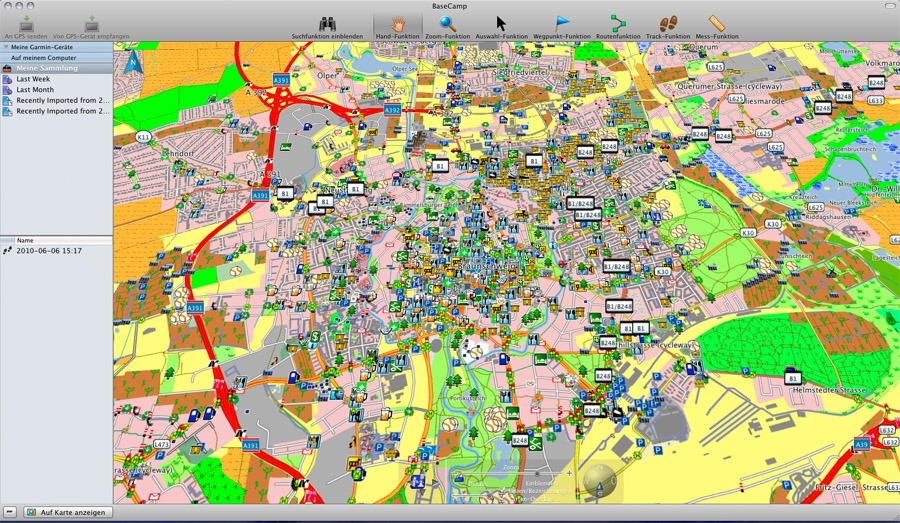
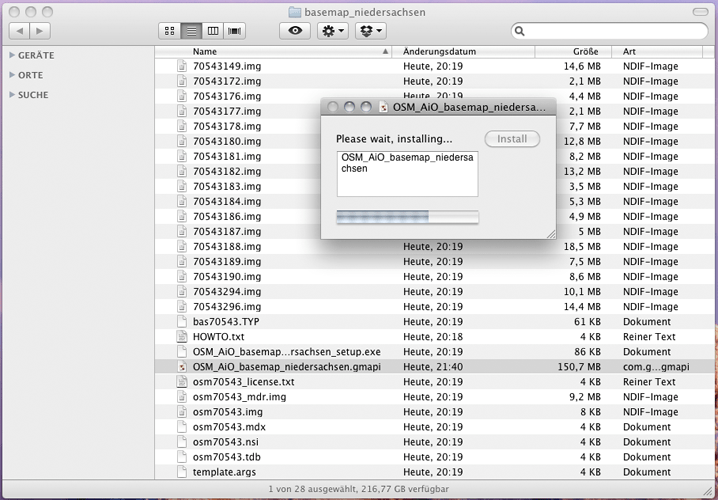 The directory of the unpacked map now contains a “.gmapi” file. We can install it simply by double-clicking it. When we now open Garmin BaseCamp with the map selected, it looks like this: